How to Conduct a Wi-Fi Survey on a Stick: A Step-by-Step Guide
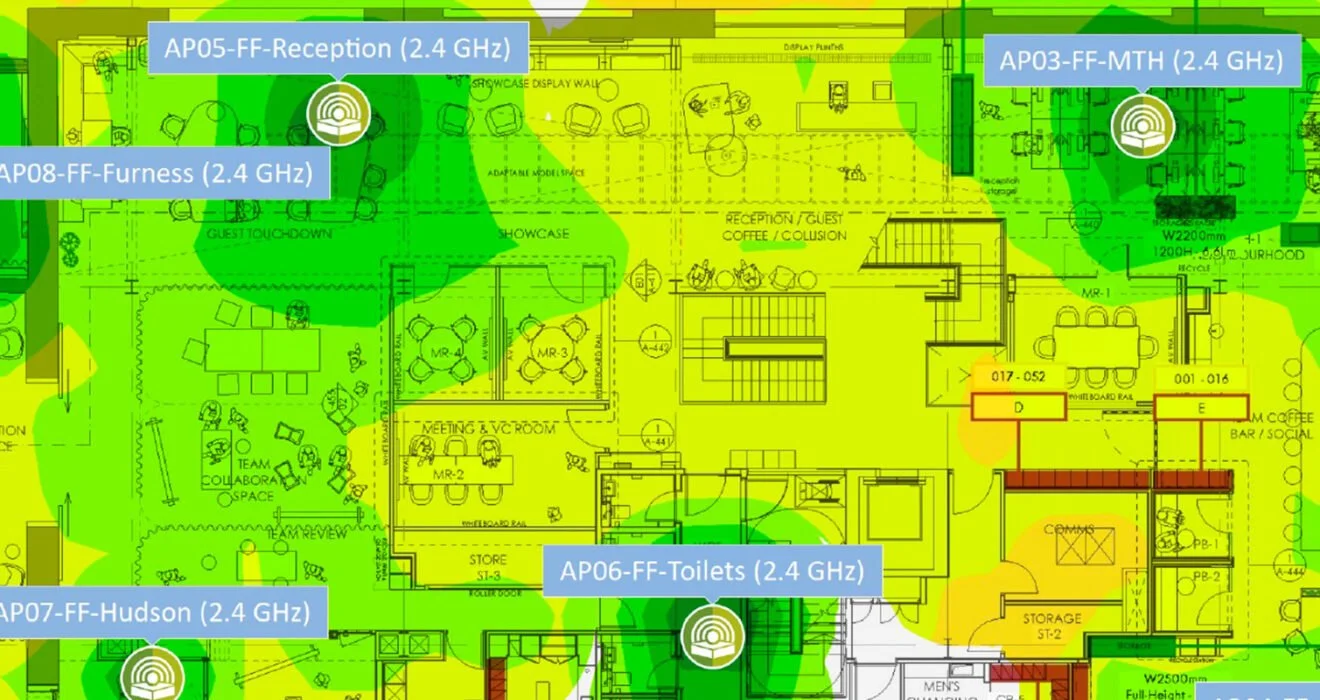
In an era where reliable Wi-Fi connectivity is essential for both personal and professional environments, conducting a thorough Wi-Fi survey is critical to optimizing network performance. A “Wi-Fi survey on a stick” refers to a portable approach that allows you to assess Wi-Fi coverage and performance easily. In this guide, we’ll walk you through the steps to conduct an effective Wi-Fi survey using this method.
What You’ll Need
Wi-Fi Survey Tool: There are various software tools available for conducting Wi-Fi surveys, including NetSpot, Ekahau, and TamoGraph. Choose one that best fits your needs.
Portable Device: A laptop, tablet, or smartphone with the survey tool installed will be necessary for data collection.
Wi-Fi Adapter: If you’re using a laptop, consider an external Wi-Fi adapter that supports the necessary frequencies (2.4 GHz and 5 GHz) and can operate in monitor mode for more accurate readings.
Pen and Paper (Optional): For noting down observations, if you prefer manual tracking.
Step-by-Step Guide to Conducting a Wi-Fi Survey on a Stick
Step 1: Planning Your Survey
Before you start, take time to plan your survey:
Define Your Objectives: Identify what you want to achieve with the survey. Are you looking to enhance coverage, identify dead zones, or troubleshoot performance issues?
Create a Map: If possible, obtain a floor plan of the area where you’ll conduct the survey. Mark key locations, including access points, walls, and obstructions, as well as areas of concern.
Determine the Survey Area: Decide on the areas you want to cover and prioritize high-traffic locations or problem areas.
Step 2: Setting Up Your Equipment
Install the Wi-Fi Survey Tool: Make sure your portable device has the survey tool installed and configured.
Connect the Wi-Fi Adapter: If using an external adapter, connect it to your device and ensure it’s functioning properly.
Step 3: Conducting the Survey
Start at a Known Location: Begin your survey at a central point to establish a baseline for your measurements.
Collect Data: Walk through the area, collecting data at regular intervals. Your survey tool will typically log parameters such as:
Signal strength (RSSI)
Signal-to-noise ratio (SNR)
Channel utilization
Data transfer speeds
Make Notes: While conducting the survey, jot down any observations regarding coverage, potential interference, or obstacles that could affect signal strength.
Scan Different Frequencies: If your survey tool allows, scan both the 2.4 GHz and 5 GHz bands to compare performance. Each frequency band has unique characteristics, and understanding both is essential for optimizing your network.
Step 4: Analyzing the Data
Once you’ve completed the survey, it’s time to analyze the data:
Review the Collected Data: Use the tools’ analytics features to visualize the results. Look for areas with weak signal strength, high interference, or bandwidth issues.
Identify Dead Zones: Highlight areas with little or no connectivity and evaluate whether additional access points are needed in those locations.
Step 5: Generating a Report
Compile your findings into a report:
Summarize Key Findings: Include an overview of coverage, performance metrics, and areas needing improvement.
Provide Recommendations: Offer actionable insights, such as repositioning existing access points, adding new units, or adjusting channel settings to mitigate interference.
Step 6: Implement Changes
Based on your findings and recommendations:
Adjust the Network: Make necessary changes to the existing Wi-Fi setup, such as relocating access points or installing new hardware.
Conduct a Follow-Up Survey: After making adjustments, consider conducting a follow-up survey to evaluate the effectiveness of the changes and ensure optimal performance.
Conclusion
Conducting a Wi-Fi survey on a stick is a practical and efficient way to assess network performance and coverage. By following these steps, you can identify areas for improvement, optimize your Wi-Fi deployment, and ensure a reliable connection for users.
If you need assistance with your Wi-Fi survey or want to optimize your network further, don’t hesitate to reach out! Our team of experts is here to help you achieve seamless connectivity and enhance your network performance.